Simvoly Integrations: API, Connections and Setup
Simvoly supports direct connections plus automation platforms, API access and webhooks, giving businesses several ways to move data between the platform and the rest of their stack.

What integrations does Simvoly support?
Simvoly’s current integrations page groups connections around email marketing tools, payment processors, automation services, API access and webhooks. It specifically advertises connections to thousands of apps through services including Zapier, Make, Pabbly, Integrately, OttoKit and ApiX-Drive.
That gives you three broad integration approaches: use a direct connection when Simvoly supports the service natively, use an automation platform when a prebuilt connector can bridge the systems, or use API/webhook capabilities when the workflow needs custom logic.
The best option is not necessarily the most technical one. Prefer the simplest connection that reliably transfers the data your business needs and can be monitored when something fails.
Start with native connections
Native connections are usually the first place to look because they reduce the number of systems involved. Simvoly’s official integrations page currently highlights categories such as email marketing and payment processing in addition to broader automation options.
Before enabling a connection, define what should move between systems. A payment connection has a different responsibility from a CRM or email connection. Write down the source record, destination record and fields that must remain consistent.
Do not assume that an integration synchronizes every field in both directions. Test a representative contact, purchase or form submission and inspect the result at the destination.
Plan the data flow before connecting tools
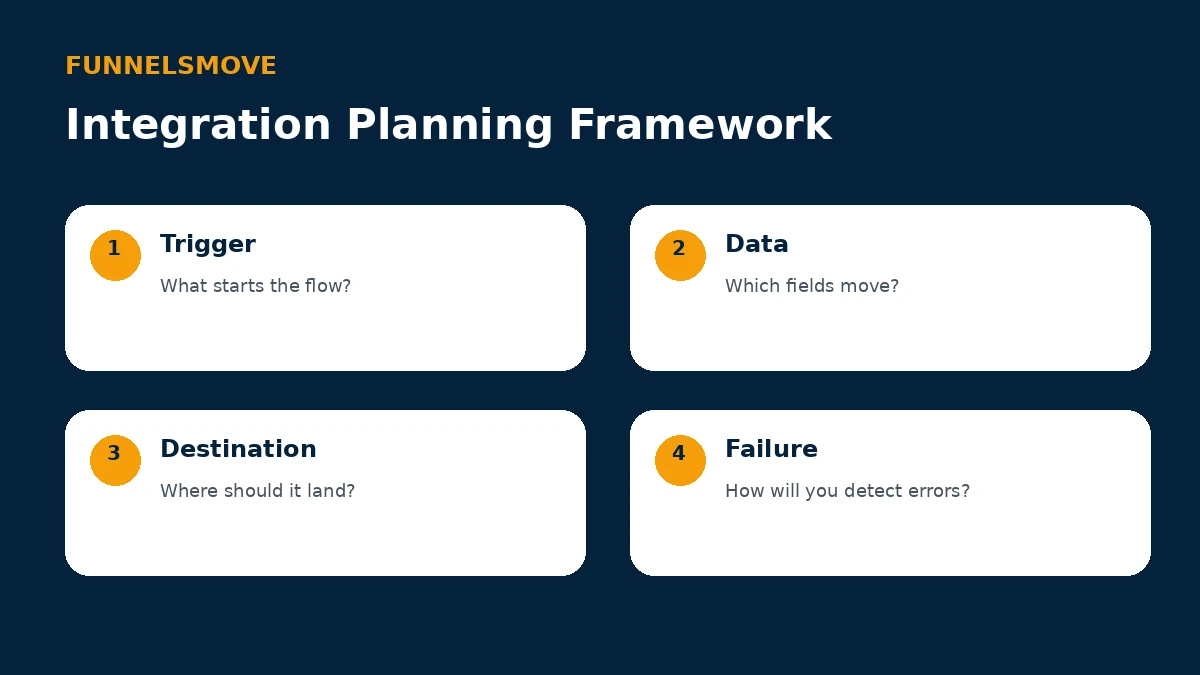
A reliable integration starts with four questions: what event triggers the flow, which data needs to move, where the data should land, and how the team will detect a failure. This framework matters more than the connector brand.
Use realistic test records rather than only ideal data. Include optional fields, existing contacts and the kinds of values that often cause duplicate records. Document the expected result so another team member can verify the workflow later.
Zapier, Make and other automation platforms
Simvoly’s current integrations page says it can connect to thousands of apps through Zapier, Make, Pabbly, Integrately, OttoKit or ApiX-Drive. These middleware services can be useful when Simvoly and the destination do not have the direct workflow you need.
Middleware adds flexibility but also adds another subscription, another set of credentials and another potential failure point. Use clear automation names, keep ownership documented and avoid chains that nobody on the team understands.
For important revenue or lead workflows, configure alerts or periodic checks. A silent automation failure can be more damaging than a manual process because the team may assume the data is moving.
Simvoly API and custom integrations
Simvoly’s public integrations page currently links to API capabilities and separately references a White Label API. API access is appropriate when a developer needs controlled data exchange or when an off-the-shelf automation does not cover the required workflow.
Treat API keys and credentials as secrets. Do not place them in public HTML, client-side JavaScript, screenshots or documentation that visitors can access. Store them in an appropriate server-side or secret-management environment.
Before commissioning custom code, confirm the exact endpoints and authentication available for your account and use case. Public product pages establish that API capability exists, but implementation details should come from the current API documentation rather than assumptions.
Where webhooks fit
Webhooks are useful when one system should notify another after an event. Simvoly publicly lists API and webhooks as integration options, which can support event-driven workflows without repeatedly polling for changes.
Design webhook handling defensively. Validate incoming data, log failures, avoid processing the same event twice when possible and make retries safe. If the destination is temporarily unavailable, the business should know how the event will be recovered.
The exact webhook events and payloads can vary by product area and account context, so verify current documentation for the workflow you intend to automate.
Connecting Simvoly with CRM and marketing tools
Simvoly already includes native CRM and marketing capabilities, so an external CRM or email platform should have a clear purpose. You may keep an external system because it is the company-wide source of truth, because its automation is deeper, or because another team already operates there.
Decide which system owns each field. If both systems can edit contact status, tags or subscription information without a rule for precedence, synchronization can create confusing loops or stale data.
For a simple business, using Simvoly’s native CRM may remove integration work entirely. For a mature organization, a carefully defined connection to the established CRM may be more appropriate than migrating every process.
Payment and commerce connections
Payment integrations sit close to revenue, so test them more rigorously than a low-risk content workflow. Confirm successful payments, failed payments, refunds, recurring transactions and the customer record created after purchase.
Also verify what downstream automations depend on the transaction. A purchase might grant course access, apply a CRM tag, start an email sequence or notify an external fulfillment system. Test the whole chain rather than only the checkout confirmation.
Never use live customer credentials or expose secret payment keys in page code while testing.
Integration troubleshooting checklist
When a connection fails, first confirm that the trigger actually occurred and that the source record contains the expected data. Then check credentials, permissions, field mapping and any filters in the automation.
Next, inspect logs in the middleware or destination. Look for rate limits, rejected values, duplicate-record rules and authentication errors. Re-run with a controlled test record after each change instead of changing several settings at once.
If the workflow is business-critical, document a manual fallback. Knowing how to recover a missed lead or order is part of integration design.
When to integrate versus consolidate
An integration is justified when an external tool provides important capability or serves as the company’s established system of record. It is less compelling when the connection merely recreates a function Simvoly already handles adequately for your business.
Each additional tool creates cost, credentials, maintenance and another point where data can diverge. Consolidation can reduce that burden, but only if the native replacement meets your requirements.
Use the Simvoly platform guide for the broader stack and the Simvoly review for fit considerations.
Bottom line on Simvoly integrations
Simvoly provides several integration paths rather than forcing every workflow through one connector. Start native where possible, use automation middleware for common cross-app workflows, and reserve API/webhook development for requirements that justify the added complexity.
Whatever method you choose, define ownership, test real data and monitor failures. Integration quality is an operational process, not just a successful connection screen.
Integration governance for growing teams
Once several automations exist, treat them as production systems rather than personal shortcuts. Maintain an inventory with the workflow owner, trigger, destination, credentials location, expected volume and business impact. That record makes troubleshooting much faster when a team member leaves or a service changes.
Use naming conventions that reveal purpose. A name such as “Website lead → sales CRM” is easier to understand than “Zap 14.” Separate test and live workflows where the connector allows it, and never experiment on a production payment flow with real customer records.
Review integrations after major platform changes and at least periodically even when nothing appears broken. Authentication can expire, destination fields can change and a once-useful automation can become redundant after a native feature is added.
For regulated or sensitive data, involve the appropriate legal or security owner before connecting systems. Moving data through middleware can change which vendors process it and where credentials or logs are stored.
Explore Simvoly
Review the current platform, trial and plan details directly before deciding whether it fits your workflow.