HighLevel Facebook & Meta Integrations Guide
HighLevel can connect Facebook and Instagram lead-generation campaigns to the CRM so Instant Form responses map into contact fields and can trigger follow-up workflows. Reliable setup depends on the correct Meta assets, permissions, field mapping and consent process.
For broader context, see our HighLevel platform guide, HighLevel review and HighLevel setup guide.
How do Meta Lead Ads connect to HighLevel?
HighLevel supports connecting Facebook and Instagram lead-generation campaigns so submitted lead-form data can sync into the CRM. HighLevel's current setup documentation covers both an existing Facebook integration and campaign creation through its Ad Manager. Once fields are mapped, lead details such as name, email, phone and custom answers can populate corresponding HighLevel contact fields.
The integration moves lead data; it does not guarantee lead quality, advertising performance or conversion. Those outcomes depend on targeting, creative, offer, form design, follow-up and market conditions.
Accounts, assets and permissions you need
Current HighLevel documentation requires the relevant Meta connection, a Facebook Page and a Meta ads account for Ad Manager setup. Instagram can be selected when the appropriate account is connected and available. The person authorizing the integration must have sufficient access to the required business assets and lead data.
Meta's permissions and business-access model can change, so troubleshoot access at the asset level rather than repeatedly reconnecting without checking ownership. Agencies should document which party owns the Page, ad account, Instagram account and CRM connection.
Field mapping and contact creation
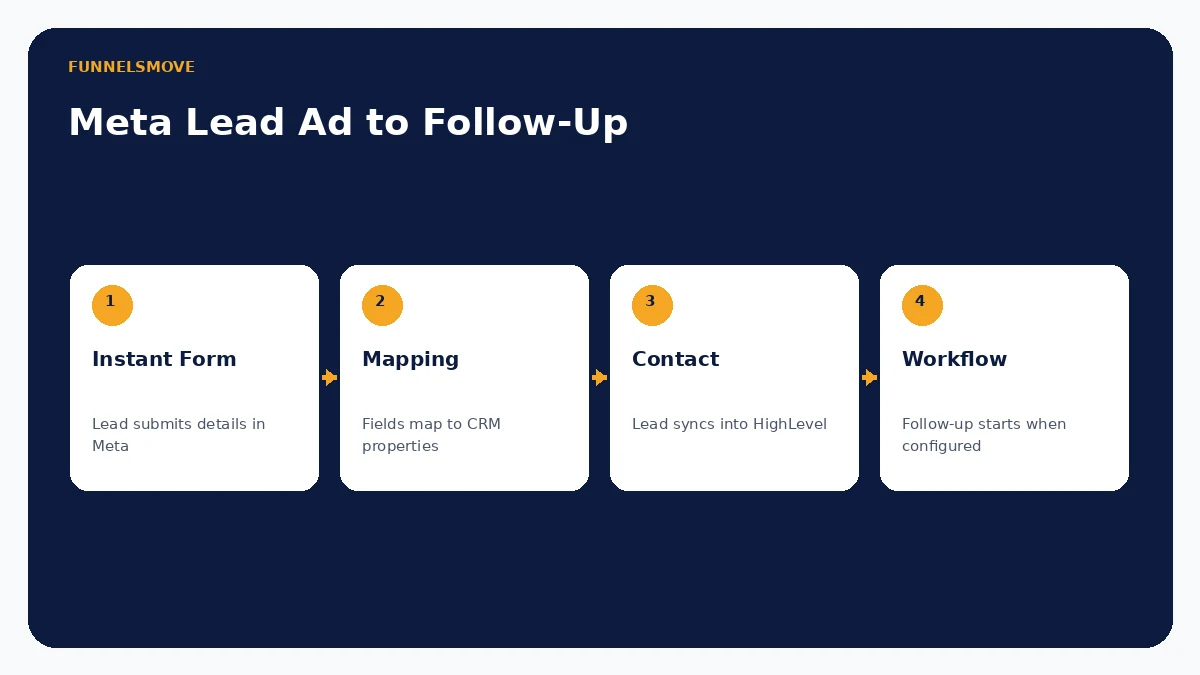
Field mapping connects each Meta Instant Form response to the intended HighLevel CRM field. Standard details such as name, email and phone are straightforward, but custom questions require deliberate mapping. A mismatched field can silently make automation less useful even when the lead itself appears in the CRM.
After mapping, verify the actual contact record created by a test submission. Check phone/email formatting, custom answers, source attribution and duplicate behavior. If the lead should enter a specific pipeline or receive a tag, confirm that the downstream workflow—not just the sync—handles it.
From Lead Ad submission to HighLevel follow-up
HighLevel documents a Facebook Lead Form Submitted workflow trigger. That means a successful sync can become the start of lead assignment, internal notifications, email/SMS follow-up or other supported actions. Keep the first response appropriate to the consent and channel permissions collected on the Meta form.
Our HighLevel workflows guide covers automation design. If the campaign sends prospects to a booking flow, the calendars guide explains appointment logic and reminders.
Testing the integration before spending heavily
Run a controlled test before relying on the integration for live lead handling. Submit a test lead, confirm that it reaches the correct HighLevel sub-account, inspect every mapped field, and verify that the intended workflow enrolls exactly once. Check internal notifications and customer-facing messages.
If a lead does not appear, work through the chain: Meta asset access, Page connection, selected form, field mapping, sync preference and workflow filters. Reauthorization can be necessary when permissions or ownership change, but it should not be the first troubleshooting step without identifying the failure point.
Privacy, consent and messaging responsibilities
Lead Ads can collect personal information inside Meta. The advertiser remains responsible for an appropriate privacy notice, lawful collection and downstream use. A lead's submission does not automatically authorize every future communication channel in every jurisdiction.
Store only data needed for the stated purpose and honor opt-outs. If HighLevel workflows send email or SMS after the lead sync, apply the consent and messaging requirements relevant to the audience and location. Do not use the integration to bypass Meta policies or communications law.
Facebook, Instagram and other Meta integration intents
The approved keyword cluster also contains Facebook Messenger, Instagram DM and pixel-related searches. Those are related Meta integrations but are not identical to Lead Ads. HighLevel supports additional Facebook/Instagram connections and messaging features, while pixel or conversion-tracking setup has a different technical purpose from CRM lead syncing.
Keep those concepts separate in implementation: an Instant Form sync moves lead data; Messenger/Instagram connections handle conversations; tracking code records site or funnel events. Do not assume connecting one automatically configures the others.
When the native Meta connection is a good fit
The native connection is useful for agencies and lead-generation businesses that want Meta leads to enter HighLevel without CSV exports or a separate connector. It is strongest when the CRM should immediately assign, qualify or follow up with a lead.
An external integration platform or custom API approach may be more appropriate when leads must be transformed across several systems, when enterprise data governance requires a separate integration layer, or when the native field model does not support the required process. For broader options, see our HighLevel integrations guide.
Evaluate HighLevel with your real workflow
Use a representative setup, confirm account-specific limits and costs, and test normal and failure paths before putting the process in front of customers.
Visit HighLevel (opens in a new tab)Sources checked
Product and integration documentation was reviewed on September 16, 2026. Pricing, permissions and feature availability can change; verify account-specific settings before deployment.