HighLevel & WordPress: Integration, Hosting and Fit
HighLevel does not automatically replace WordPress. You can keep WordPress as the content-management system and connect HighLevel CRM assets through the LeadConnector plugin, or use HighLevel's paid WordPress hosting and migration options.
For broader context, see our HighLevel platform guide, HighLevel review and HighLevel setup guide.
Does HighLevel replace WordPress?
Not necessarily. WordPress is a general-purpose content-management system with a large theme and plugin ecosystem. HighLevel includes its own websites and funnels, but it also supports WordPress hosting and a LeadConnector plugin that connects HighLevel features to WordPress. For many businesses, the two products are complementary rather than mutually exclusive.
The approved search intent centers on HighLevel WordPress hosting pricing and integration. The practical decision is therefore whether to keep an existing WordPress site, move its hosting into HighLevel, embed HighLevel CRM features into it, or rebuild selected conversion pages with HighLevel's native site/funnel tools.
What the LeadConnector WordPress plugin can do
HighLevel's current LeadConnector plugin documentation supports chat-widget integration, HighLevel funnel pages inside WordPress, dynamic custom values, and dedicated blocks or shortcodes for forms, surveys and calendars. On WordPress sites hosted through HighLevel, the plugin is automatically installed; externally hosted WordPress sites can install and connect it manually.
This is useful when a business wants to preserve WordPress content and design while sending captured leads into HighLevel. It also reduces the need to paste separate embed scripts for every supported asset.
Forms, calendars, chat and CRM automation
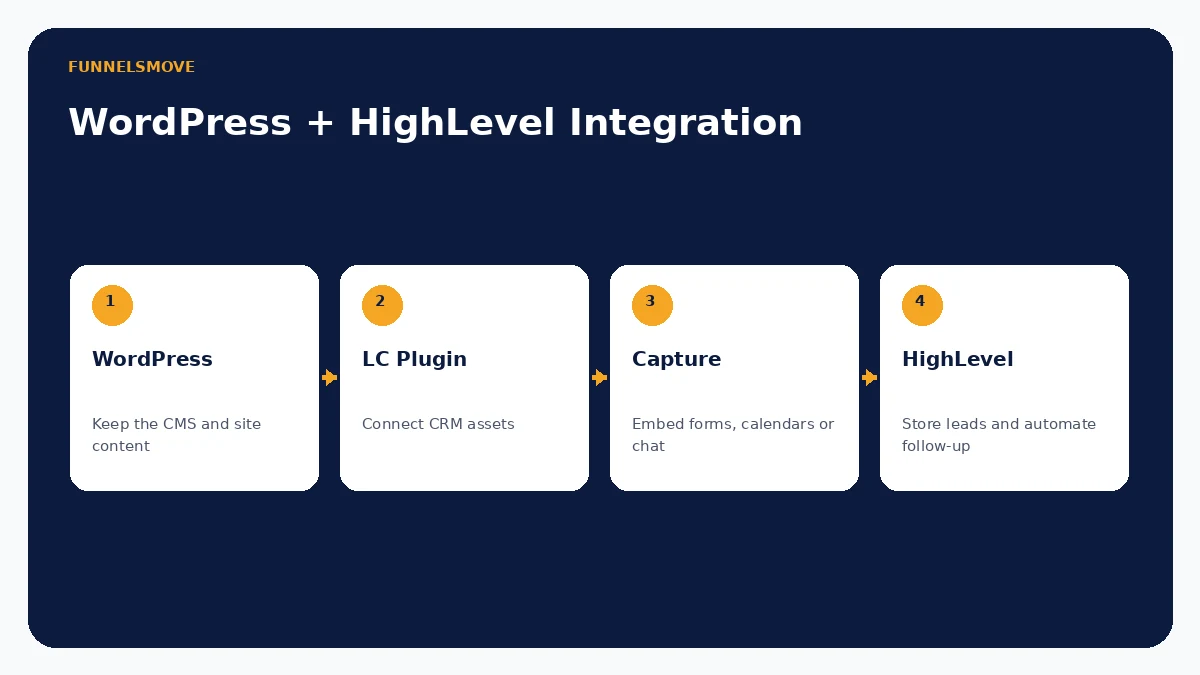
A common architecture keeps WordPress responsible for public pages and content while HighLevel handles conversion and follow-up. A visitor can submit a HighLevel form, book through a HighLevel calendar or start a HighLevel chat experience embedded in WordPress. The resulting contact can then move into CRM and workflow automation.
This separation is often cleaner than rebuilding a mature WordPress site solely to add CRM features. See our forms guide and calendar guide for the capture layer.
Landing pages, funnels, domains and subdomains
HighLevel's plugin can expose supported funnel pages through WordPress, while HighLevel also has its own website and funnel builder. Businesses can therefore keep a main WordPress domain for content and use HighLevel for specific campaign experiences, either through the plugin or a separate domain/subdomain architecture.
Avoid creating duplicate versions of the same page on several hosts. Decide which system owns each canonical URL, keep analytics consistent and test forms after domain changes. Our HighLevel website builder guide covers the native page-building side.
HighLevel WordPress hosting pricing and features
HighLevel's current WordPress hosting documentation lists WordPress hosting as an additional charge on top of the HighLevel subscription. As of September 16, 2026, the published monthly examples are $10/month for Standard, $220/month for a higher tier and $497/month for the top listed tier; annual billing is shown at lower effective monthly rates. Plan specifications differ, so verify the current table before purchase.
HighLevel documents features including Cloudflare CDN, SSL, backups/restores, staging, SFTP, theme/plugin access and plan-dependent storage. Hosting inside HighLevel can simplify agency administration, but it does not change WordPress into HighLevel's native website builder—the site remains WordPress.
Migrating an existing WordPress site into HighLevel hosting
HighLevel currently offers two documented migration routes: the LC Migrator plugin for self-service migration and a White-Glove migration path for agency users. The LC Migrator is installed on the source WordPress site and transfers the site into the selected HighLevel WordPress hosting destination.
Migration should include more than copying files. Test forms, redirects, canonical tags, analytics, caching, email behavior, plugin licenses and DNS before switching production traffic. Keep a backup and rollback path until the migrated site has been validated.
SEO, plugins and technical limitations
WordPress remains attractive when a site depends on a specialized editorial workflow, a particular SEO plugin, custom theme behavior or a broad plugin ecosystem. HighLevel WordPress hosting preserves access to themes and plugins, but HighLevel's native website/funnel builder is a different publishing environment.
Do not assume moving hosting improves rankings. Search performance depends on content quality, crawlability, redirects, canonicalization, performance and many other factors. A migration can damage visibility when URLs or metadata change without a plan.
Which setup suits different businesses?
| Situation | Practical setup |
|---|---|
| Established content-heavy WordPress site | Keep WordPress; connect HighLevel capture/CRM features |
| Agency wanting centralized WordPress operations | Evaluate HighLevel WordPress hosting and LC Plugin |
| Campaign-led business with limited CMS needs | Consider HighLevel native sites/funnels |
| Custom WordPress application | Preserve WordPress and integrate selectively |
The right answer depends on what WordPress already does for the business. Replacing a stable CMS creates migration work; keeping two overlapping page builders creates governance work. Assign each system a clear responsibility.
Evaluate HighLevel with your real workflow
Use a representative setup, confirm account-specific limits and costs, and test normal and failure paths before putting the process in front of customers.
Visit HighLevel (opens in a new tab)Sources checked
Product and integration documentation was reviewed on September 16, 2026. Pricing, permissions and feature availability can change; verify account-specific settings before deployment.